Why 100% In-Memory Client-Side Data Processing Matters for Security and Privacy
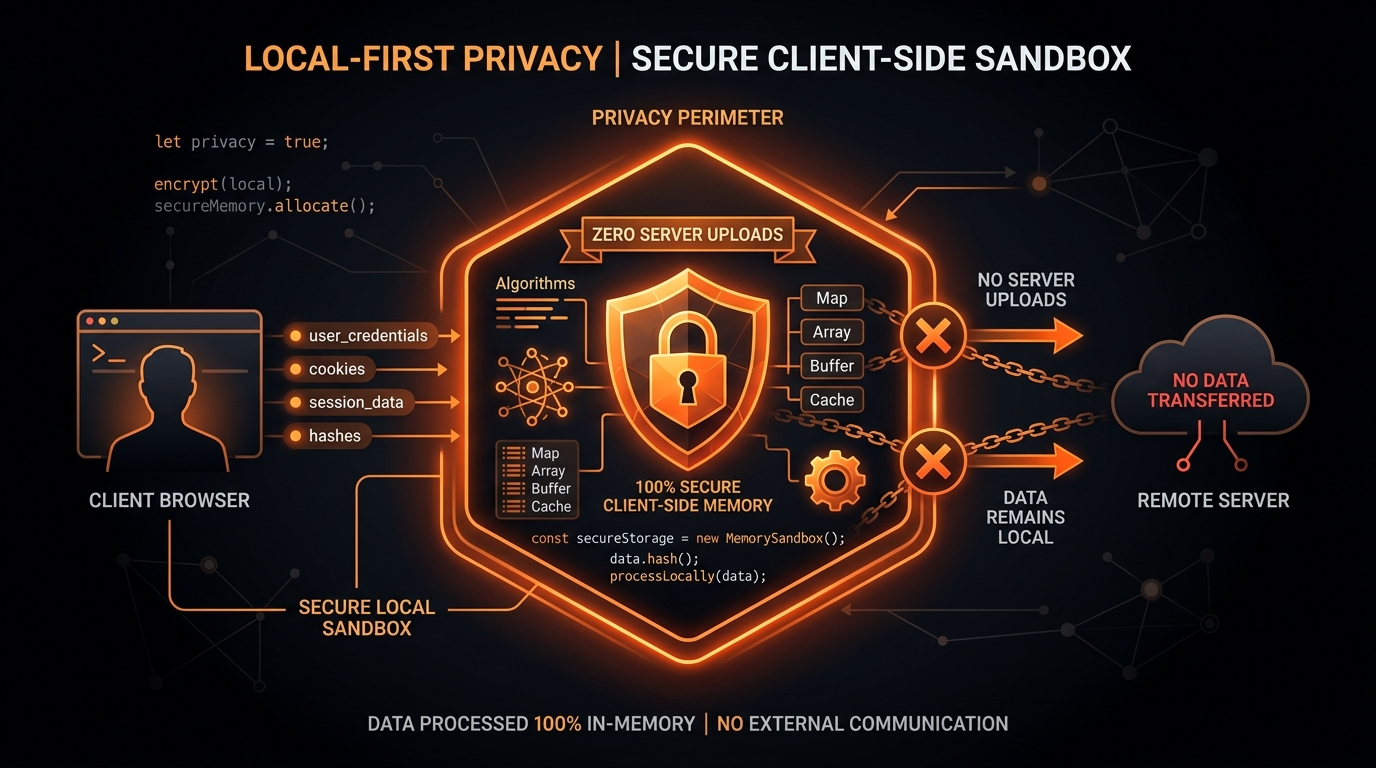
In the contemporary digital landscape, cybersecurity, corporate espionage defense, and regulatory privacy compliance are paramount concerns for software engineering organizations worldwide. Developers, security researchers, data scientists, and business analysts routinely handle sensitive datasets: production database snapshots containing Personally Identifiable Information (PII), payment transaction logs, internal API authorization tokens, user session identifiers, and confidential business metrics.
Yet, when developers need to quickly convert a JSON dataset into a CSV spreadsheet for analysis or reporting, they often paste their data into free online converter tools without considering the architectural implications: Where is this data being transmitted, who owns the servers, and how is it stored? In this guide, we examine the severe security risks associated with cloud-based conversion utilities and explain why a 100% client-side, in-memory processing architecture is the only acceptable model for confidential data handling.
The Inherent Vulnerabilities of Cloud-Based Converters
The vast majority of legacy online conversion tools rely on a traditional client-server architecture. When a user pastes JSON or uploads a file on these websites, the following sequence of events occurs:
- The web browser packages the raw data into an HTTP POST request and transmits it across the public Internet to a remote backend server.
- The remote server saves the payload to a temporary disk directory, cache server (like Redis), or database.
- A backend script (running Python, PHP, or Java) parses the file, executes the conversion, and writes a CSV file to server storage.
- The server returns a download link or streams the CSV back to the user's browser.
Even when a service claims to "automatically delete files after one hour," your confidential data is exposed to multiple points of vulnerability:
- Server Access Logs: Web servers (like Nginx or Apache) and reverse proxies often log request bodies, query parameters, or file paths in unencrypted access logs.
- Third-Party Infrastructure Breaches: Free converter websites are frequently targeted by automated scanners. An unpatched server vulnerability, misconfigured AWS S3 bucket, or shared hosting environment can expose stored conversion files to unauthorized threat actors.
- Man-in-the-Middle (MITM) Interception: If SSL/TLS certificates are misconfigured or if corporate proxy inspection is active, data in transit can be monitored.
- Regulatory Violations: Transmitting customer PII to unknown third-party cloud servers directly violates the European Union General Data Protection Regulation (GDPR), California Consumer Privacy Act (CCPA), and HIPAA, creating massive legal liabilities for your enterprise.
The Zero-Knowledge Client-Side Architecture
At JSON to CSV Studio, we designed our platform around a zero-knowledge, local-first computing paradigm. When you load jsontocsv.me, your browser downloads a static bundle of HTML, CSS, and minified JavaScript assets once.
From that moment forward, every single computational operation executes entirely inside your device's local web browser sandbox:
- Local V8 Engine Execution: Parsing, schema harmonization, dot-notation flattening, and RFC 4180 CSV serialization are executed directly by your computer's CPU inside the browser's JavaScript V8 engine.
- Zero Outbound Network Traffic: No data payloads, text strings, or files are ever transmitted to our servers or any third-party endpoints.
- Instant Memory Purging: Data resides exclusively in temporary browser RAM. When you click "Clear Editor" or close the browser tab, the data is immediately deallocated and wiped from memory by the browser's garbage collector.
- Offline Functionality: Because all logic resides in client-side JavaScript, you can disconnect your Internet connection or enable Airplane Mode, and the converter will continue to function flawlessly.
Compliance Alignment: GDPR, CCPA, and HIPAA
| Regulatory Framework | Compliance Mandate | Client-Side Studio Guarantee |
|---|---|---|
| GDPR (European Union) | Strictly regulates the transfer and processing of personal data by third-party data processors. | 100% Compliant: No data is ever transmitted to a third-party server. No Data Processing Agreement (DPA) is required. |
| CCPA / CPRA (California) | Prohibits unauthorized selling, sharing, or retention of consumer personal information. | 100% Compliant: Zero telemetry, zero tracking cookies, zero data retention. |
| HIPAA (Healthcare) | Requires strict administrative and physical safeguards for Protected Health Information (PHI). | Safe for Local Dev: PHI remains completely on the local workstation; no Business Associate Agreement (BAA) needed. |
How to Verify Client-Side Privacy in Your Browser
We believe data privacy should be provable, not just promised. Any developer can verify our zero-network architecture using standard browser Developer Tools:
- Open DevTools in Chrome, Firefox, Edge, or Safari by pressing
F12(orCmd+Option+Ion macOS). - Switch to the Network tab and click the "Fetch/XHR" filter.
- Paste a sensitive JSON payload into the converter and click "Convert to CSV".
- Observe the Network activity log: zero network requests are sent during the entire conversion process.
Real-World Case Study: Preventing Accidental Data Leaks in Financial Engineering
To understand the high stakes of client-side privacy, consider a real-world incident at a financial technology startup. A data analyst needed to quickly inspect a sample batch of credit card transaction logs returned by a payment gateway API. To convert the JSON response into a spreadsheet for management review, the analyst pasted the data into a popular free online JSON to CSV converter website found via a search engine.
Unbeknownst to the analyst, the free converter website was hosted on an unsecured cloud server that stored all uploaded request payloads in an unencrypted public directory for 24 hours. The transaction payload contained sensitive customer payment records, cardholder names, billing addresses, and authorization codes. Within hours, an automated security scanner discovered the exposed files, creating an urgent security crisis and regulatory disclosure requirement for the company.
This costly security incident could have been completely prevented by utilizing a 100% in-browser client-side converter. When using JSON to CSV Studio, the payment data is processed exclusively in the workstation's local RAM. No network requests are ever dispatched, no files are written to remote servers, and the data vanishes from memory the moment the browser tab is closed.
Deep-Dive: Content Security Policy (CSP) Enforcement
To provide ironclad architectural proof that no data can leak from the application, client-side tools should configure strict HTTP Content Security Policy (CSP) response headers. A strict CSP header instructs the browser to block any unauthorized network connections attempted by third-party scripts or compromised dependencies:
Content-Security-Policy: default-src 'self'; script-src 'self' https://www.googletagmanager.com; style-src 'self' 'unsafe-inline' https://fonts.googleapis.com; font-src https://fonts.gstatic.com; connect-src https://www.google-analytics.com; img-src 'self' data:; frame-ancestors 'none';Under this security policy, the browser will forcefully terminate any attempt by JavaScript to dispatch POST or PUT requests containing data to arbitrary external domains.
Frequently Asked Questions on Client-Side Security
Can third-party browser extensions intercept my data during conversion?
Browser extensions with broad permissions can technically inspect the DOM of web pages. However, because JSON to CSV Studio performs all parsing and data transformation directly inside local JavaScript variables and Web Workers without writing the data to the DOM tree, extension scripts cannot easily capture intermediate dataset payloads. For the highest security posture when working with classified or confidential data, always perform conversions inside an Incognito or Private Browsing window where third-party extensions are disabled by default.
Does client-side conversion work when my computer is disconnected from the Internet?
Yes. Because the entire conversion engine is packaged inside static JavaScript bundles that load into your browser cache upon initial visit, you can disconnect your Wi-Fi, unplug your Ethernet cable, or activate Airplane Mode. The converter will continue to execute complete JSON parsing, recursive flattening, and CSV export locally with zero degradation in performance or functionality.
Corporate Data Governance Recommendations
- Block cloud-based file conversion utilities that upload data to external backend servers.
- Whitelist validated client-side, local-first developer tools like JSON to CSV Studio.
- Educate engineering staff on the difference between client-side JavaScript execution and cloud-based file processing.
- Incorporate client-side encryption and zero-knowledge tools into formal developer security onboarding.
The Threat Landscape: Why Cloud Converters Are High-Value Targets
From a cybersecurity threat modeling perspective, free file conversion portals represent extremely high-value reconnaissance targets for cybercriminals. Every day, thousands of employees from financial institutions, healthcare providers, e-commerce stores, and software companies paste production payloads into online converters.
An attacker who compromises a single cloud conversion server can harvest:
- Production Database Snapshots: Customer lists, hashed passwords, email addresses, and phone numbers.
- API Tokens and Private Keys: AWS access keys, Stripe secret keys, and JWT authentication tokens embedded in debug logs.
- Financial and Payment Data: Transaction ledgers, banking identifiers, and payroll records.
- Proprietary Intellectual Property: Internal algorithmic parameters, customer usage telemetry, and roadmap metrics.
The Sandboxed Browser Security Model
Modern web browsers like Google Chrome, Mozilla Firefox, Apple Safari, and Microsoft Edge feature sophisticated multi-process sandboxing architectures. When JavaScript executes on a web page:
- Process Isolation: The renderer process running the web page has zero access to your computer's operating system kernel, local filesystem, or other running applications.
- Same-Origin Policy Enforcement: Scripts executing on one domain cannot inspect or access memory, cookies, or storage from other open browser tabs.
- Zero Ingress Ports: A browser tab does not open any listening network ports on your machine, eliminating external remote attack vectors.
Step-by-Step Security Audit Guide for IT Teams
Internal security review teams can validate JSON to CSV Studio's zero-knowledge architecture using the following audit checklist:
- Open the application in an incognito/private browsing window to isolate extensions.
- Inspect the source code: Verify that all assets loaded are static HTML, CSS, and minified client-side JavaScript.
- Review the Network Tab: Ensure no POST, PUT, or WebSocket connections are initiated during payload parsing.
- Review Content Security Policy (CSP): Verify strict script source restrictions and the absence of unauthorized tracking endpoints.
The Zero-Trust Security Paradigm in Developer Tooling
In traditional enterprise IT environments, security models relied on perimeter defenses (firewalls and corporate VPNs). However, in modern cloud-native software engineering, cybersecurity frameworks have transitioned to a Zero-Trust Architecture. Under Zero-Trust principles, no tool, server, or network endpoint is inherently trusted, regardless of where it is hosted.
When software engineers use external developer utilities (such as JSON formatters, base64 decoders, or JSON to CSV converters), the Zero-Trust mandate requires verifying that data never leaves the engineer's local machine. Client-side, in-browser tools align perfectly with Zero-Trust principles because they eliminate external attack surfaces entirely: there is no remote server to compromise, no database to breach, and no data pipeline to intercept.
Corporate Regulatory Checklist: GDPR Article 32 Compliance
Article 32 of the European Union General Data Protection Regulation (GDPR) mandates that organizations implement appropriate technical and organizational measures to ensure a level of security appropriate to data risk. Using client-side conversion tools satisfies GDPR Article 32 requirements through:
- Data Minimization: Zero storage of personal data on third-party servers.
- Confidentiality and Integrity: Processing takes place entirely within the isolated memory sandbox of the user's local operating system.
- Instant Erasure: Memory is immediately purged upon session completion with no residual cache artifacts on cloud storage.
Ready to Convert Your Datasets?
Transform nested or complex JSON payloads into clean, RFC 4180 compliant CSV files directly in your browser with zero server uploads.
Open Free Converter Studio