Handling Nulls, Undefined Values, and Complex Arrays in CSV Conversions
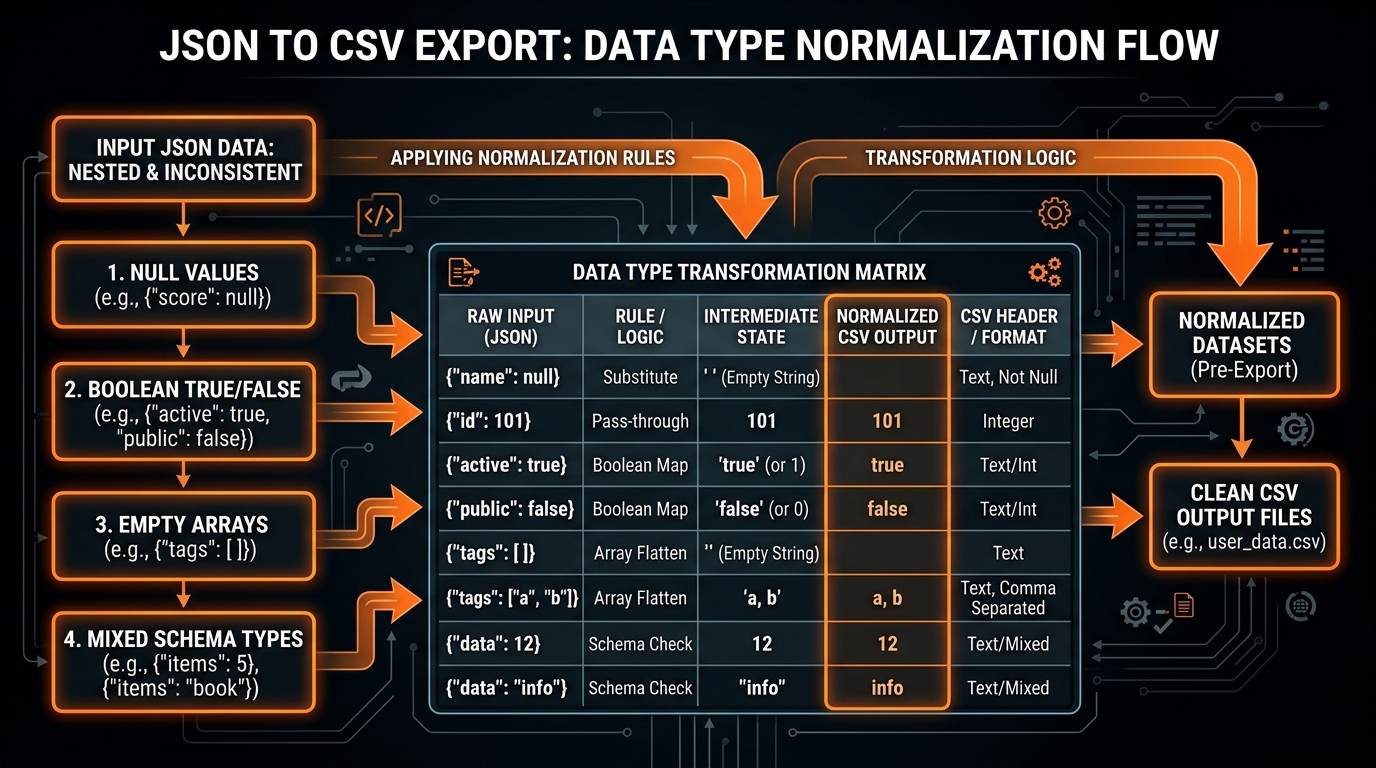
In modern data structures and dynamic programming languages, the distinction between different "empty" or "collection" states is rich and precise. In JavaScript and JSON, a variable can be explicitly assigned null, left undefined (missing key), set to an empty string "", set to numeric zero 0, set to boolean false, or populated with an array of values [...]. Each of these states conveys distinct semantic meaning to software developers, APIs, and business systems.
However, when converting JSON data into Comma-Separated Values (CSV), all of this rich type information is compressed into plain text cells separated by delimiters. Without an intentional, mathematically consistent strategy for handling nulls, missing keys, and complex arrays, your converted spreadsheets will suffer from ambiguous data representations, shifted columns, or silent data corruption during database ingestion. In this guide, we break down the best practices for handling complex and absent data types during tabular conversions.
The Semantic Spectrum of Missing Data in JSON
Let us review the distinct states of data absence in JSON documents:
null: An intentional, explicit statement that a value does not exist (e.g."spouse_name": nullfor an unmarried user).- Missing Key (
undefined): An optional field that was omitted entirely from a given document instance (e.g. schema drift or optional attributes). - Empty String (
""): A valid, defined string value containing zero characters. - Zero (
0) / False (false): Falsy primitive values that represent meaningful numerical or logical data points and must never be converted into empty cells. - Empty Array (
[]): An existing collection that currently holds zero items.
Handling Nulls vs Missing Values in CSV
In standard CSV, an empty field between two delimiters (e.g. field1,,field3) represents absent data. When importing CSV files into relational database management systems like PostgreSQL, MySQL, Snowflake, or SQL Server, engineers must configure how empty fields are interpreted.
| JSON Source State | Recommended CSV Export Format | SQL Database Interpretation | Best Practice Notes |
|---|---|---|---|
"description": null |
Unquoted empty: ,, |
SQL NULL |
Represents true absence of data in database columns. |
"description": "" |
Quoted empty: ,"", |
SQL empty string '' |
Preserves explicit empty string distinction in text columns. |
"quantity": 0 |
Numeric literal: ,0, |
Integer 0 |
Never serialize numeric 0 as an empty string. |
"is_active": false |
Boolean literal: ,false, |
Boolean FALSE |
Never serialize boolean false as empty. |
| Field Omitted | Unquoted empty: ,, |
SQL NULL / Default Value |
Two-pass schema scanner pads missing keys uniformly. |
Handling Arrays of Primitives in CSV
When an object contains an array of scalar primitives—such as strings, numbers, or tags (e.g. "categories": ["electronics", "audio", "wireless"])—there are three primary approaches for tabular export:
Approach 1: Secondary Delimiter Joining (Recommended for Spreadsheets)
Join the array elements into a single string using a secondary delimiter (such as a semicolon ; or pipe |) and wrap the field in RFC 4180 quotes:
// Resulting CSV Field:
"electronics; audio; wireless"
This allows human analysts viewing the data in Microsoft Excel or Google Sheets to see the complete list within a single cell without disrupting table geometry.
Approach 2: JSON Stringification (Recommended for Cloud Data Warehouses)
Serialize the array directly into valid JSON text inside the quoted CSV cell:
// Resulting CSV Field:
"["electronics", "audio", "wireless"]"
Cloud analytical warehouses like Snowflake, Google BigQuery, and Databricks can ingest quoted JSON strings directly into semi-structured columns (such as Snowflake ARRAY or Postgres JSONB) using native ingestion functions.
Handling Arrays of Objects (1-to-Many Relationships)
The most difficult scenario in tabular data conversion occurs when an array contains nested sub-objects (for example, an e-commerce order record containing an array of purchased line items). Because a single 2D spreadsheet row cannot natively represent multiple child records without breaking column definitions, developers must choose between two architectural patterns:
Pattern A: Parent Summary Aggregation
Extract the most important aggregate metrics into the parent row (e.g. total_items: 3, order_subtotal: 149.99) and serialize the detailed line item list as a stringified JSON column. This keeps every order on a single row.
Pattern B: Cartesian Row Explosion (Relational Normalization)
Unroll the child array so that each item becomes an independent row in the CSV table, repeating the parent attributes (such as order_id, customer_name) across all child rows. This mirrors a traditional relational database SQL JOIN.
Real-World Case Study: Transforming Customer Profiles with Missing Attributes
To illustrate the critical importance of proper null and array handling, let us examine a real-world scenario involving customer profile migrations between a NoSQL database (MongoDB) and a cloud data warehouse (PostgreSQL / Snowflake).
In MongoDB, user documents frequently possess optional attributes. For example, User A might have filled out their bio, phone number, and social media handles, while User B only provided an email address. Additionally, each user profile contains an array of assigned security roles (e.g. ["admin", "billing_manager"]) and an array of permission tags.
If you convert this MongoDB collection to CSV without explicit null handling, empty fields and missing attributes can cause serious database import failures:
- If missing attributes are omitted from rows, column headers will shift out of order, placing phone numbers in the email column or bio text in the phone column.
- If numeric fields (like account balance or login count) are converted to empty strings instead of
0orNULL, strict SQL database loaders will reject the entire batch with type coercion errors. - If arrays of security roles are joined with commas inside unquoted cells, the database will interpret each role as a separate column, corrupting the schema.
By enforcing our standard conversion rules—using two-pass global schema scanning, quoting multi-item arrays with semicolon delimiters, and preserving literal zeros—the customer data imports cleanly into PostgreSQL with 100% data integrity on the first try.
Step-by-Step Complete Type-Safe Serializer Implementation
Below is a production-tested JavaScript serializer that correctly evaluates and formats all JSON primitive and composite types for standard CSV output:
function sanitizeAndFormatValue(val, arrayStrategy = 'join', delimiter = ',') {
  if (val === null) return '';
  if (val === undefined) return '';

  if (typeof val === 'boolean') {
    return val ? 'true' : 'false';
  }

  if (typeof val === 'number') {
    if (!Number.isFinite(val)) return '';
    return String(val);
  }

  if (Array.isArray(val)) {
    if (val.length === 0) return '';
    if (arrayStrategy === 'join') {
      const joined = val.map(item => typeof item === 'object' ? JSON.stringify(item) : String(item)).join('; ');
      return `"${joined.replace(/"/g, '""')}"`;
    } else {
      const jsonStr = JSON.stringify(val);
      return `"${jsonStr.replace(/"/g, '""')}"`;
    }
  }

  if (typeof val === 'object') {
    const jsonStr = JSON.stringify(val);
    return `"${jsonStr.replace(/"/g, '""')}"`;
  }

  const str = String(val);
  if (str.includes(delimiter) || str.includes('"') || str.includes('\n') || str.includes('\r')) {
    return `"${str.replace(/"/g, '""')}"`;
  }

  return str;
}
Frequently Asked Questions on Type Conversions
Why did my telephone numbers or zip codes lose their leading zeros in Excel?
Microsoft Excel automatically attempts to infer data types upon opening CSV files. If a zip code is 07030, Excel interprets it as a number and displays 7030. To preserve leading zeros, format the field as an explicit string literal (e.g. ="07030") or import the CSV using Excel's Data -> From Text/CSV wizard with the column set to Text.
How should boolean values be formatted for universal database compatibility?
While some databases accept 1 and 0, standard lowercase true and false strings are universally parsed across PostgreSQL, Snowflake, BigQuery, and modern Python/Node.js data frameworks.
Summary Best Practices
- Never coerce numeric
0or booleanfalseinto empty strings. - Use unquoted empty fields (
,,) fornulland quoted empty strings (,"",) for literal blank text. - Use semicolon or pipe delimiters when joining primitive arrays for Excel workflows.
- Use JSON stringification for complex nested object arrays destined for analytical cloud data warehouses.
- Standardize all date and timestamp fields to ISO 8601 UTC strings before CSV export.
Matrix and Multi-Dimensional Array Flattening
In scientific computing, geospatial mapping, and machine learning telemetry, JSON objects frequently contain 2D coordinate matrices (e.g. "coordinates": [[12.49, 41.89], [12.50, 41.90]]). Converting multi-dimensional matrices into flat CSV columns requires a consistent coordinate indexing strategy:
| Matrix Shape | Flattening Format | Target Application |
|---|---|---|
2D Coordinates [[x1,y1],[x2,y2]] |
point_0_x, point_0_y, point_1_x, point_1_y |
GIS Software (QGIS, ArcGIS, Mapbox) |
Bounding Box [minX, minY, maxX, maxY] |
bbox_minX, bbox_minY, bbox_maxX, bbox_maxY |
Computer Vision & Object Detection Pipelines |
Matrix Rows [[1,2,3],[4,5,6]] |
row_0_col_0, row_0_col_1, ... |
Linear Algebra & Machine Learning Models |
Database Ingestion Configuration for Relational SQL Systems
When loading your converted CSV files into relational SQL databases, configuring the database loader to distinguish between NULL and empty string values is essential:
PostgreSQL COPY Command Syntax
-- Importing CSV into PostgreSQL with explicit NULL handling
COPY customer_records(id, username, email, phone, bio)
FROM '/data/customers.csv'
WITH (
  FORMAT csv,
  HEADER true,
  NULL '',
  QUOTE '"',
  ESCAPE '"'
);
MySQL LOAD DATA INFILE Syntax
-- Importing CSV into MySQL
LOAD DATA INFILE '/var/lib/mysql-files/customers.csv'
INTO TABLE customer_records
FIELDS TERMINATED BY ','
ENCLOSED BY '"'
ESCAPED BY '"'
LINES TERMINATED BY '\r\n'
IGNORE 1 LINES;
Snowflake Bulk COPY INTO Syntax
-- Importing CSV into Snowflake Data Cloud
COPY INTO analytics.public.raw_orders
FROM @my_s3_stage/orders/
FILE_FORMAT = (
  TYPE = 'CSV'
  FIELD_DELIMITER = ','
  SKIP_HEADER = 1
  FIELD_OPTIONALLY_ENCLOSED_BY = '"'
  NULL_IF = ('', 'NULL', 'null')
  EMPTY_FIELD_AS_NULL = TRUE
);
Floating Point Precision, Large Integers (BigInt), and Scientific Notation
Numerical precision is a frequent source of silent data corruption when converting JSON payloads containing financial figures, cryptographic hashes, or database primary keys. In JavaScript, all numbers are represented as IEEE 754 double-precision 64-bit floating-point numbers, which can safely represent integers up to $2^{53} - 1$ (9,007,199,254,740,991).
When handling JSON numbers that exceed this limit (such as 64-bit database IDs like 18446744073709551615 or Twitter Snowflake IDs), developers must take special precautions:
- BigInt and String Serialization: Ensure that 64-bit integers and large identifier numbers are treated as literal text strings rather than parsed as floating-point numbers, preventing loss of least-significant digits.
- Preventing Scientific Notation Coercion: Very large or very small decimal numbers (e.g.
0.00000012or1e15) are often formatted in scientific exponential notation by default. When exporting to CSV, format numbers explicitly as fixed decimal strings to maintain exact financial accuracy.
Date and Timestamp Normalization: ISO 8601 vs UTC Epochs
Because JSON has no native Date data type, timestamps in APIs are typically transmitted as ISO 8601 strings (e.g. "2026-08-29T14:30:00Z") or Unix epoch millisecond integers (e.g. 1756477800000). When exporting to CSV:
- ISO 8601 UTC Strings (Recommended): Universally parsed without ambiguity by Microsoft Excel, Google Sheets, PostgreSQL, Snowflake, and Python Pandas.
- Consistent Timezone Handling: Always normalize date strings to UTC (denoted by the trailing
Z) to prevent timezone misinterpretation when analysts open CSV files across different global offices.
Ready to Convert Your Datasets?
Transform nested or complex JSON payloads into clean, RFC 4180 compliant CSV files directly in your browser with zero server uploads.
Open Free Converter Studio