JSON vs CSV in Modern Data Engineering & ETL Pipelines
Take a close look at your monthly AWS or Snowflake bill. If you’re wondering why your cross-AZ data transfer fees look terrifying, don't blame your machine learning models just yet. Blame the fact that your ingestion pipelines are streaming millions of verbose, repetitive JSON strings across your network around the clock.
Application developers love JSON. It’s flexible, it makes API development easy, and you don’t have to lock in a rigid schema on day one. But once that firehose hits data engineering, raw JSON becomes an expensive performance tax.
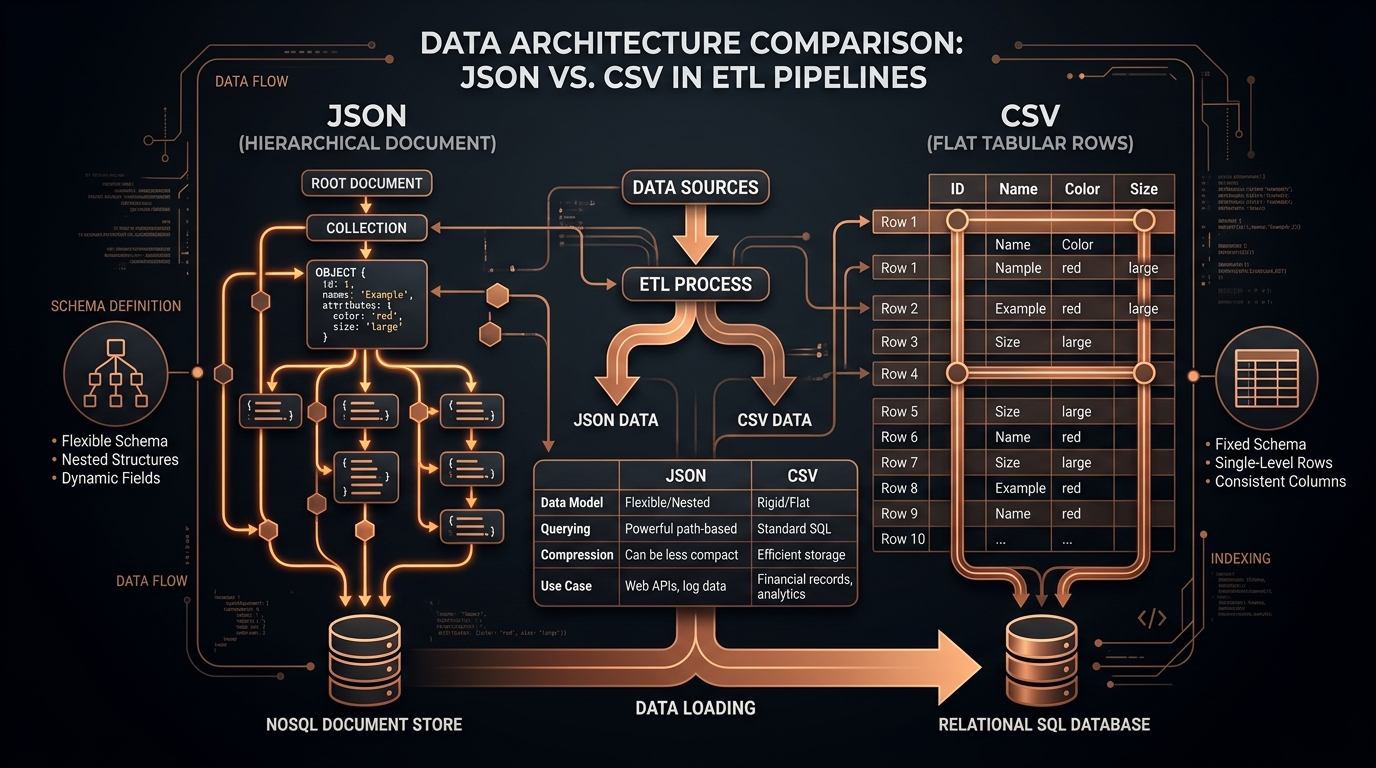
Here’s a breakdown of the architectural trade-offs between JSON and CSV—why repeating keys eat your bandwidth, why Gzip isn’t a free lunch, and how modern data stacks use hybrid pipelines to get the best of both worlds.
The Engineering Breakdown
| Engineering Vector | JSON (Hierarchical Document) | CSV (Relational Tabular) |
|---|---|---|
| Mental Model | Nested Tree of Key-Value Pairs | 2D Relational Matrix (Rows × Columns) |
| Schema Flexibility | Schema-on-Read (Highly flexible) | Schema-on-Write (Strict header contract) |
| Byte Efficiency | Low (Repeats property names for every single row) | High (Headers defined once on Line 1) |
| Warehouse Ingestion | Requires CPU-intensive JSON parsing functions | Direct hardware-speed vector ingestion (COPY) |
| Best Suited For | REST APIs, Webhooks, Event-driven microservices | Staging tiers, Bulk warehouse ingestion, Reports |
The Key Duplication Tax: How JSON Wastes Bandwidth
The fundamental problem with JSON in high-volume pipelines is simple: it repeats metadata on every single row.
Look at a standard payment webhook payload:
Typical JSON Payload[
{"transaction_id": "tx_98124", "merchant_name": "Apex Retail", "amount_cents": 5400, "status": "settled"},
{"transaction_id": "tx_98125", "merchant_name": "Nova Labs", "amount_cents": 1250, "status": "settled"},
{"transaction_id": "tx_98126", "merchant_name": "Echo Dynamics", "amount_cents": 8920, "status": "pending"}
]
In those three lines, the key names "transaction_id", "merchant_name", "amount_cents", and "status" along with quotes and braces eat up more raw bytes than the actual transaction data.
Scale that up to 10 million events a day:
- In raw JSON, property names alone generate over 480 MB of duplicate string overhead daily.
- In CSV, declaring headers once on line 1 slashes that dataset from 780 MB down to 210 MB—a 73% reduction in wire volume.
"Doesn't Gzip Fix That?" (The Hidden Decompression Cost)
The instant response from developers is usually: "Just turn on Gzip or Zstd in S3. Compression deduplicates the repeating keys anyway."
Sure, compression shrinks files on disk. But it introduces two hidden costs:
- CPU Decompression Bottleneck: When your ingestion worker reads a 1 GB compressed JSON file, it burns heavy CPU cycles decompressing it into memory. A 1 GB compressed CSV decompresses roughly 3x faster simply because there's far less uncompressed text to reconstruct.
- RAM Inflation in Worker Pods: Once decompressed in RAM, that JSON object graph inflates to its full size, forcing you to provision larger, more expensive cloud VMs.
The $14,000 AWS Egress Trap: A Real Cloud Story
Here’s a real example of how format choices hit your bottom line.
A fintech platform had backend microservices in AWS Availability Zone us-east-1a pushing event logs to a Kafka cluster in us-east-1b. Every message was serialized as verbose JSON with long property names like "customer_international_billing_address_line_two".
At 80 million events a day, the raw payload volume generated 18.4 Terabytes of cross-AZ traffic every month. Because AWS bills $0.01 per GB for cross-AZ data transfer, that naming choice alone added over $1,800 a month ($21,600 a year) in inter-zone network fees.
By flattening event streams into compact, delimited CSV/binary staging files at the producer level, they cut transfer volume by 72%, saving thousands of dollars in recurring cloud fees.
How Raw JSON Slows Down Data Lakes (Iceberg & Delta Lake)
If your team uses lakehouse formats like Apache Iceberg, Delta Lake, or Apache Hudi, dumping raw JSON directly into S3 causes the classic small file and metadata bloat problem:
- Manifest Bloat: Formats like Iceberg track metadata manifests for every file. Ingesting millions of raw JSON snippets causes manifests to balloon into gigabytes, slowing query planning to a crawl.
- No Vectorized Pruning: Query engines (Trino, DuckDB, Spark) cannot use min/max stats or dictionary encoding on raw JSON strings. A simple query like
WHERE amount > 500forces the engine to scan and parse 100% of the raw string text. - The Staging Pattern: Staging incoming JSON as normalized CSVs before batch-converting them into Snappy-compressed Parquet files drops scan times from minutes down to sub-second responses.
Handling Schema Drift Without Crashing Pipelines
What happens when an upstream provider like Stripe or Shopify adds a new field to their webhook payload without warning?
Here’s how resilient pipelines handle schema drift when converting JSON to CSV:
- The Catch-All Column (
unmapped_attributes): When your flattener finds a key that isn't in your target database table, serialize that key-value pair into a genericextra_fields_jsoncolumn instead of throwing a fatal error. - Schema Alerts: Have your converter log a lightweight metric when unknown keys appear so your data team can update table schemas ahead of time.
Warehouse Ingestion Benchmarks: Postgres, ClickHouse, and Snowflake
Ingestion speed is where CSV completely outclasses raw JSON:
1. PostgreSQL COPY Command
Postgres has had the native COPY command for decades. It bypasses query parsing and transaction overhead, streaming raw bytes directly into table storage:
COPY staging_transactions FROM '/data/transactions.csv' WITH (FORMAT csv, HEADER true);
Loading 5,000,000 rows from CSV takes 4.2 seconds (~1.19M rows/sec). Parsing those same 5,000,000 records from a raw JSONB column with jsonb_to_recordset takes 38.7 seconds—nearly 10x slower.
2. ClickHouse Vectorized Ingestion
ClickHouse uses SIMD CPU instructions to locate CSV delimiters directly inside hardware registers:
clickhouse-client --query="INSERT INTO transactions FORMAT CSVWithNames" < data.csvClickHouse chews through CSV streams at over 850 MB per second, maxing out NVMe SSD throughput.
High-Performance Streaming with DuckDB
Instead of spinning up a heavyweight Spark cluster to transform JSON payloads into tabular formats, modern data teams use DuckDB:
duckdb_flatten_pipeline.pyimport duckdb
import time
def run_fast_pipeline():
start = time.perf_counter()
con = duckdb.connect()
# DuckDB automatically parses nested JSON and outputs RFC 4180 CSV in seconds
con.sql("""
COPY (
SELECT
id::BIGINT AS order_id,
customer.email::VARCHAR AS customer_email,
total_cents / 100.0 AS total_usd,
created_at::TIMESTAMP AS order_date,
list_aggregate(tags, 'string_agg', '; ') AS tags
FROM read_json_auto('s3://my-lake/raw_webhooks/*.json.gz')
) TO 's3://my-lake/staging/orders.csv'
(FORMAT CSV, HEADER TRUE, DELIMITER ',');
""")
print(f"✓ DuckDB finished transformation in {time.perf_counter() - start:.2f}s")
if __name__ == '__main__':
run_fast_pipeline()The Hybrid Pipeline Architecture
You don’t have to pick one format for everything. The smartest data teams use a hybrid architecture:
- Ingestion (JSON): Keep your REST APIs and webhooks in JSON for developer speed and flexibility.
- Staging (Flatten to CSV): Use lightweight streaming workers or DuckDB to flatten incoming payloads into clean CSV staging files.
- Warehouse Storage (Columnar Parquet): Bulk load the sanitized CSVs into Snowflake, BigQuery, or ClickHouse, letting the warehouse compact them into columnar Parquet files.
Quick Format Guide
- JSON: Great for external APIs, webhooks, and polymorphic payloads with shifting schemas.
- CSV: The fastest format for staging buffers, bulk database imports, and spreadsheet exports.
- Parquet: The undisputed king for long-term storage and analytical queries in data lakes.
Need to inspect or convert an API payload quickly without setting up a pipeline? Try our local-first JSON to CSV Converter Studio.