Handling Nulls, Booleans, and Complex Arrays in Tabular Exports
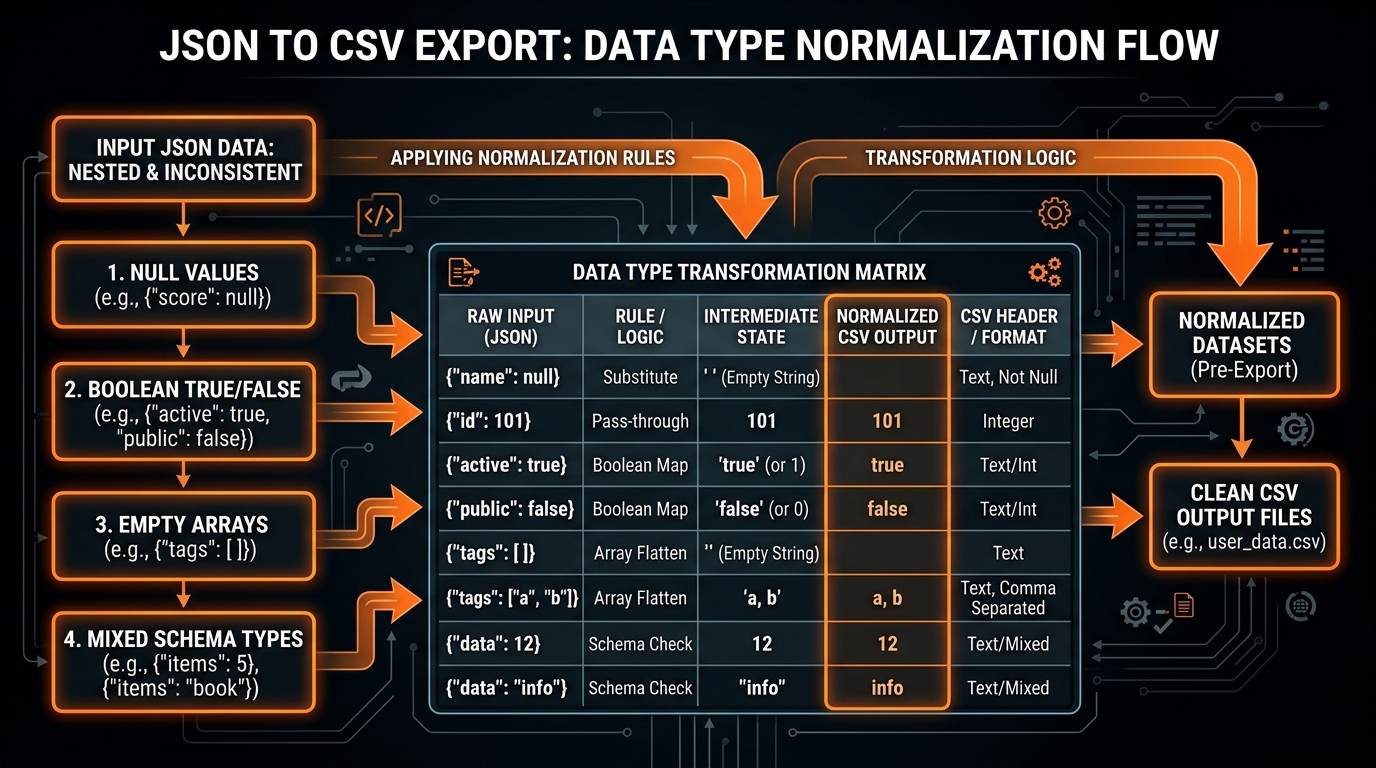
Languages like TypeScript, Python, and Go spoil us with rich types. You know the exact difference between the boolean true and the string "true". You know that null is missing, "" is an empty string, and 0 is an actual number.
Then you export to CSV.
And all that type safety goes straight into the paper shredder.
In a CSV file, every single cell is just dumb, unquoted or quoted text. There are no type headers, no metadata tags, and no schemas. Whatever tool opens your file next—Postgres, Snowflake, Pandas, or Excel—is left guessing what you meant. When it guesses wrong, you get silent data corruption.
The Null Trap: Empty vs. "NULL" vs. \N
When a JSON property is null or missing, what should you actually print into the CSV row?
Turns out different engines interpret empty fields in wildly contradictory ways:
| Target Tool / Database | Empty Cell (,,) |
Quoted Empty (,"",) |
Literal String (,NULL,) |
|---|---|---|---|
PostgreSQL COPY |
Interpreted as real SQL NULL. |
Interpreted as an empty string (""). |
Disaster: Inserts the literal string "NULL"! |
| MySQL / MariaDB | Interpreted as empty string. | Interpreted as empty string. | Literal string "NULL" (Requires \N for real NULL). |
| Microsoft Excel | Blank cell. | Blank cell. | Renders the text NULL. |
| Python Pandas | Parsed as np.nan. |
Parsed as empty string or NaN. | Parsed as NaN by default. |
null and undefined to an unquoted empty string (,,). Never emit the literal word "null" or "NULL", unless you want customers whose actual last name is "Null" to break your queries.
How Excel Ate a $50,000 Invoice: A True Story
Think type loss is just an academic problem? Here’s a real incident that happened to a marketplace company’s finance ops team.
They regularly dumped billing transaction logs from Postgres into CSVs. Each record had a 64-bit integer customer ID like 9007199254740999.
A finance analyst opened the CSV in Excel to calculate monthly reconciliation totals. Excel saw only digits and automatically coerced the value into a 64-bit float. But IEEE 754 double-precision floats only have 53 bits of precision (up to 9007199254740991). Excel silently rounded the last digit down to 9007199254740990.
When the analyst ran a VLOOKUP, the customer ID failed to match any account in the CRM, causing automated alerts to flag a $50,000 invoice as uncollected revenue.
The fix? Wrap large numeric IDs in an explicit formula string (="9007199254740999") so Excel is forced to treat the cell as an immutable string.
Automated SQL DDL Schema Inferrer (TypeScript)
When converting JSON to CSV for database bulk-loading, you usually need a destination SQL table ready to receive the data. Here’s a handy TypeScript utility that inspects sample records and generates a clean CREATE TABLE statement matching your CSV export:
interface ColumnType {
  name: string;
  type: 'BIGINT' | 'DOUBLE PRECISION' | 'BOOLEAN' | 'TIMESTAMPTZ' | 'TEXT';
  nullable: boolean;
}

export function inferSqlTableSchema(records: Record[], tableName = 'imported_data'): string {
  const columns = new Map();

  for (const record of records) {
    for (const [key, val] of Object.entries(record)) {
      if (!columns.has(key)) {
        columns.set(key, { name: key, type: 'BIGINT', nullable: false });
      }

      const col = columns.get(key)!;
      if (val === null || val === undefined || val === '') {
        col.nullable = true;
        continue;
      }

      if (typeof val === 'boolean') {
        if (col.type !== 'TEXT') col.type = 'BOOLEAN';
      } else if (typeof val === 'number') {
        if (!Number.isInteger(val) && col.type === 'BIGINT') {
          col.type = 'DOUBLE PRECISION';
        }
      } else if (typeof val === 'string') {
        // Detect ISO-8601 timestamps
        if (/^\d{4}-\d{2}-\d{2}T\d{2}:\d{2}:\d{2}/.test(val)) {
          if (col.type !== 'TEXT') col.type = 'TIMESTAMPTZ';
        } else {
          col.type = 'TEXT';
        }
      }
    }
  }

  const defs = Array.from(columns.values()).map(c =>
    `    "${c.name}" ${c.type}${c.nullable ? '' : ' NOT NULL'}`
  );

  return `CREATE TABLE ${tableName} (\n${defs.join(',\n')}\n);`;
}
The 64-Bit Integer Hazard: Why Large IDs Get Muffled
If your system uses Twitter Snowflake IDs, Discord message IDs, or 64-bit Stripe IDs (like 1748293819284719283), spreadsheet software will butcher them:
- Excel detects digits and assumes it’s a math number.
- It caps precision at 15 decimal digits.
- It silently replaces the last digits with zeroes, turning
1748293819284719283into1748293819284710000.
Guard against this by checking JavaScript's MAX_SAFE_INTEGER:
function sanitizeLargeId(val) {
  // If the number exceeds JavaScript's MAX_SAFE_INTEGER (9007199254740991), force text mode
  if (typeof val === 'number' && val > Number.MAX_SAFE_INTEGER) {
    return `="${val}"`; // Forces spreadsheet engines to preserve exact digits
  }
  return val;
}
The Boston Zip Code Problem (Dropped Leading Zeros)
The exact same issue happens with US postal codes and phone numbers. If a customer lives in Boston with zip code "02134", Excel sees digits, strips the leading zero, and saves it as integer 2134.
Either quote values using Excel formula syntax (="02134") or ensure your downstream database loader treats postal codes strictly as VARCHAR columns.
Booleans: Lowercase vs. Uppercase vs. 1 / 0
In JSON, booleans are strictly true or false. In CSV, choose your formatting based on who’s reading the file:
true / false(Lowercase): The standard for Postgres, Snowflake, BigQuery, and Pandas.TRUE / FALSE(Uppercase): The spreadsheet favorite. Excel and Google Sheets immediately recognize uppercase tokens and center-align them as native booleans.1 / 0(Binary): Best for machine learning feature pipelines in Scikit-Learn or XGBoost.
Timestamps: Stick to UTC ISO-8601
Never export localized dates like "04/05/2026". In the US, that’s April 5th. In Europe, that’s May 4th.
Always serialize timestamps in UTC ISO-8601:
2026-08-28T14:30:00.000ZIt’s unambiguous, sorts chronologically in alphabetical order, and works everywhere.
A Battle-Tested Type Normalizer (JavaScript)
Here’s a clean normalizer you can drop right into your CSV generation pipeline:
csv_type_normalizer.js/**
* Normalizes mixed JS data types into clean RFC 4180 CSV cells.
*/
function normalizeCell(val, delimiter = ',') {
// 1. Handle Nulls & Undefined
if (val === null || val === undefined) {
return '';
}
// 2. Handle Booleans (standard lowercase)
if (typeof val === 'boolean') {
return val ? 'true' : 'false';
}
// 3. Handle Dates (Force ISO UTC)
if (val instanceof Date) {
return val.toISOString();
}
// 4. Handle Arrays
if (Array.isArray(val)) {
const isSimple = val.every(v => v === null || typeof v !== 'object');
val = isSimple ? val.map(v => v ?? '').join('; ') : JSON.stringify(val);
}
// 5. Handle Objects
if (typeof val === 'object') {
val = JSON.stringify(val);
}
// 6. Escape special characters for RFC 4180
const str = String(val);
if (str.includes(delimiter) || str.includes('"') || str.includes('\n') || str.includes('\r')) {
return `"${str.replace(/"/g, '""')}"`;
}
return str;
}Quick Summary
- Map
nullandundefinedto empty strings so you don't end up with literal "NULL" strings in your database. - Format booleans as lowercase
true/falsefor SQL warehouses orTRUE/FALSEfor Excel. - Wrap 64-bit IDs in formula strings so Excel doesn't zero out trailing digits.
- Always stick to UTC ISO-8601 for dates.
Want to convert your JSON without type-coercion bugs? Try our in-memory JSON to CSV Converter Studio.