How to Flatten Nested JSON Structures into Relational CSV Tables
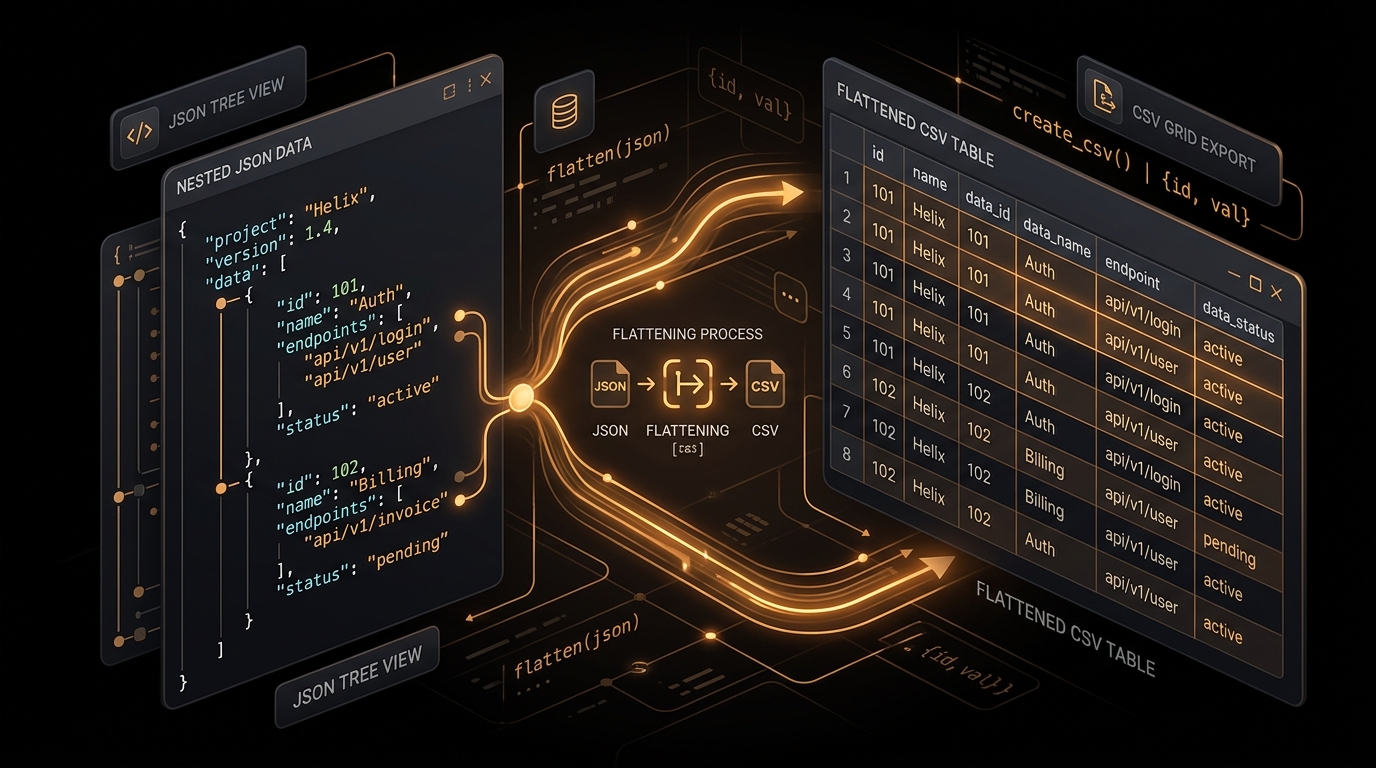
It’s late on a Friday. Your backend team just pushed a shiny new API endpoint returning rich, beautifully structured JSON objects nested five layers deep. Everyone’s stoked. The UI is snappy. Then someone from product pings you on Slack asking for a "quick CSV dump" so leadership can run pivot tables in Excel.
You open the raw JSON.
Objects inside arrays. Lists tucked inside metadata fields. Keys that show up on some records but vanish on others. Good luck feeding that straight into a spreadsheet or a SQL database. Relational tables don’t do branching trees—they want a flat, rigid grid of rows and columns, nothing else.
Flattening sounds trivial on paper until you actually start writing the parsing code. That’s when the recursion traps, namespace collisions, and memory spikes hit.
Trees vs. Grids: The Core Mismatch
JSON and CSV represent two fundamentally opposite ways of looking at data.
JSON is a tree. You branch out from a root node, traverse down through parent keys, and eventually hit primitive values—strings, numbers, booleans, or nulls. Different branches can have wildly different depths, and no two objects in the same list are forced to share the same structure.
CSV, on the other hand, is a strict 2D matrix. Every single row has to play by the exact same rules. If row 10 has fifteen columns, row 11 better have fifteen columns too, or your downstream pipeline will throw a fit.
Turning a tree into a grid means converting the entire path you walked to reach a value into that value's column header.
Dot Notation vs. Underscores: The 3 AM Database Gotcha
When you squash nested paths into a single column name, you have to pick a delimiter. Usually that’s either a dot (user.address.city) or an underscore (user_address_city).
Dot notation feels clean. It mirrors how we access object properties in JavaScript or Python, and data science folks love it in Pandas. But if that CSV is destined for a Postgres, Snowflake, or Redshift warehouse via a bulk COPY command, dots are a trap.
Why? Because most SQL engines treat an unquoted dot as a schema or table separator. If Postgres sees a header like user.address.city, it tries to find a column called city inside an address table under a user schema. The import immediately crashes, leaving you scratching your head over cryptic syntax errors.
user_address_city). Keep dots for NoSQL payloads or pure Python scripts where SQL engines aren't involved.
The Textbook Recursive Flattener (And How It Bites You)
Most developers start with a classic recursive Depth-First Search (DFS). You loop through keys, dive deeper if you hit an object, and write out values when you hit primitives.
Here’s what that looks like in JavaScript:
Recursive DFS Flattener (TypeScript / JS)/**
* Recursively flattens an object into a single-level dictionary.
*/
function flattenObjectRecursive(obj, separator = '_', prefix = '') {
let output = {};
for (const [key, value] of Object.entries(obj)) {
// Strip out pesky linebreaks or tabs in key names that could break CSV formatting
const cleanKey = key.replace(/[\r\n\t]/g, '').trim();
const compoundKey = prefix ? `${prefix}${separator}${cleanKey}` : cleanKey;
if (value !== null && typeof value === 'object' && !Array.isArray(value)) {
// It's a nested object: dive deeper
const nested = flattenObjectRecursive(value, separator, compoundKey);
Object.assign(output, nested);
} else if (Array.isArray(value)) {
// It's an array: decide how to handle it
const isSimpleList = value.every(v => v === null || typeof v !== 'object');
output[compoundKey] = isSimpleList ? value.join('; ') : JSON.stringify(value);
} else {
// It's a raw primitive value (string, number, boolean, null)
output[compoundKey] = value;
}
}
return output;
}For 90% of everyday API responses, this works fine. But feed it an unpredictable, heavily nested JSON file—say, a compiler AST, deeply nested telemetry, or an object with accidental circular references—and the V8 runtime blows right through its call stack.
Boom: RangeError: Maximum call stack size exceeded.
The Fix: An Iterative Heap Stack
If you want your flattener to never crash regardless of input depth, ditch the call stack. Use an explicit array sitting in heap memory instead. The heap has gigabytes of breathing room, so stack overflow errors become impossible:
Iterative Stack Flattener (Zero Stack Overflow Risk)function flattenObjectIterative(root, separator = '_') {
const result = {};
const stack = [{ current: root, prefix: '' }];
while (stack.length > 0) {
const { current, prefix } = stack.pop();
for (const [key, value] of Object.entries(current)) {
const compoundKey = prefix ? `${prefix}${separator}${key}` : key;
if (value !== null && typeof value === 'object' && !Array.isArray(value)) {
// Push onto heap stack instead of calling recursively
stack.push({ current: value, prefix: compoundKey });
} else if (Array.isArray(value)) {
const isSimple = value.every(v => v === null || typeof v !== 'object');
result[compoundKey] = isSimple ? value.join('; ') : JSON.stringify(value);
} else {
result[compoundKey] = value;
}
}
}
return result;
}The Array Dilemma: Squeezing Lists into Cells
Arrays are where things get messy. An array means multiple values belonging to one entity, but a CSV cell only holds one value. You’ve got three realistic options depending on what your end users actually need:
1. Semicolon Joins (For Simple Lists)
If the array is just scalar strings or numbers (e.g. ["frontend", "vue", "typescript"]), join them with a semicolon:
tags -> "frontend; vue; typescript"Clean, simple, and one JSON record stays exactly one CSV row.
2. JSON Stringify (For Complex Sub-Objects)
If the array contains full objects (like order line items), joining with delimiters makes no sense. Instead, serialize the array right back into raw JSON text inside the CSV cell:
line_items -> "[{\"sku\":\"ABC\",\"qty\":2},{\"sku\":\"XYZ\",\"qty\":1}]"
Downstream analysts can still unpack that cell using native JSON operators in Postgres (jsonb_array_elements) or Snowflake (PARSE_JSON).
3. Row Explosion (For Relational Tables)
If every item in that array represents a distinct row in a relational database, duplicate the parent data across multiple rows:
// 1 Order with 2 Line Items becomes 2 CSV rows:
order_id,customer_name,item_sku,item_qty
ORD-101,Alice Johnson,ABC,2
ORD-101,Alice Johnson,XYZ,1
The "Missing Key" Trap Across Records
Real-world JSON is messy. Record #1 might contain an optional discount_code, while Record #2 omits it and adds a vat_number.
If your code only looks at the first record to figure out CSV column headers, you’ll silently drop any field that only shows up later in the dataset. That’s silent data loss.
You have to use a two-pass approach:
- Pass 1: Flatten all records into memory and collect every unique key into a global set.
- Pass 2: Iterate through the flattened records again. For every missing key on a given record, output an empty string (
'') so column alignments stay locked.
A Drop-In Python Script for Daily ETL Jobs
Here’s a clean, zero-dependency Python script you can use straight from your terminal or drop into an automated pipeline:
flatten_pipeline.py (Python 3)import csv
import json
import sys
def flatten_dict(d, sep='_', prefix=''):
items = {}
for k, v in d.items():
new_key = f"{prefix}{sep}{k}" if prefix else k
if isinstance(v, dict):
items.update(flatten_dict(v, sep=sep, prefix=new_key))
elif isinstance(v, list):
if all(not isinstance(x, (dict, list)) for x in v):
items[new_key] = "; ".join(str(x) for x in v)
else:
items[new_key] = json.dumps(v)
else:
items[new_key] = v
return items
def convert_json_file(input_path, output_path):
with open(input_path, 'r', encoding='utf-8') as f:
data = json.load(f)
if isinstance(data, dict):
data = [data]
# Pass 1: Flatten everything and gather all unique headers
flattened_rows = [flatten_dict(record) for record in data]
all_headers = list({key: None for row in flattened_rows for key in row.keys()}.keys())
# Pass 2: Write RFC 4180 CSV
with open(output_path, 'w', newline='', encoding='utf-8') as f:
# Prepend UTF-8 BOM so Excel opens international characters cleanly
f.write('\ufeff')
writer = csv.DictWriter(f, fieldnames=all_headers, restval='', quoting=csv.QUOTE_MINIMAL)
writer.writeheader()
writer.writerows(flattened_rows)
print(f"✓ Converted {len(flattened_rows)} records into {len(all_headers)} columns.")
if __name__ == '__main__':
if len(sys.argv) > 2:
convert_json_file(sys.argv[1], sys.argv[2])Quick Takeaways
- Use underscores for relational SQL loaders; save dots for Python-only or document store tasks.
- Always run a two-pass key collection across sparse JSON feeds so you never drop optional attributes.
- Keep simple lists joined with semicolons, and stringify nested objects to preserve raw structure.
- Want to test your payload without writing custom code? Drop it into our free, local-first JSON to CSV Converter Studio for an instant preview.